
- Activating email invoicing and managing settings
- Delivery methods
- Routing and sending invoices via email
- Sender email address and reply-to address
- Appearance and language of invoice emails
Activating email invoicing and managing settings
Email invoicing is on by default for all company accounts. It can be turned off for the whole company, or for a single invoice when it is sent.
Through the API, the company’s email settings are read with the GET /v1/company/settings method and changed with the PATCH /v1/company/settings method.
📖 Maventa documentation: Email invoicing
The same settings are in the Email section of the Maventa account settings. There, the company account admin user can review and edit them, and turn the delivery channel on or off. Detailed instructions for the user interface are available here: Invoice settings - Email.
👉 Open the setting directly in Maventa: Invoice settings > Sending invoices. You'll need to sign in first if you aren't already.
The email settings include:
-
Delivery method: how the invoice reaches the recipient (see Delivery methods below).
-
Reminders: how often a reminder is sent for invoices that have not been opened, accepted or declined. Reminders are not sent for invoices delivered as attachments.
-
Message and contact details: a message to the recipient and the contact person shown in the email. A new contact email address must be confirmed before it appears in invoice emails.
-
Header image: an image at the top of the email body that helps recipients recognise the sender.
Delivery methods
The delivery method decides whether the recipient gets the invoice as an attachment or through a link to Maventa’s display service. There are four options:
-
Download link: the email contains a link and a passcode. The recipient enters the passcode to open the invoice. The sender can get a notification when the invoice is opened.
-
Attachments: the invoice PDF and its attachments are attached to the email. If the files total more than 5 MB, the email contains a download link instead. In Finland, a virtual barcode is added to the email body.
-
Merged PDF attachment: all PDF files are combined into one attachment, with the same 5 MB limit. This option cannot be used with digitally signed PDF invoices.
-
Invoice objections: the recipient must accept the invoice before seeing the payment information, and can also decline it. The sender is notified, and the invoice status is updated in Maventa.
With the download link and invoice objections options, the link is valid for 90 days after the invoice due date.
More information is available in the Maventa documentation: Email sending settings.
Routing and sending invoices via email
Automatic routing
Email is the main fallback when an invoice cannot be delivered as an e-invoice. Maventa tries the delivery channels in this order: e-invoice, email, print service. For email delivery, the recipient’s email address must be in the invoice XML or sent along with the invoice through the API.
Sending through the API
Invoices are sent with the POST /v1/invoices method. The recipient's email address can be given in the request, and it overrides any address in the invoice XML. To force email delivery, the e-invoice and print routes are turned off in the same request. Maventa then sends the invoice only by email. More information is available in the Maventa documentation: Sending an invoice via email.
The invoice XML can also be attached to the email. This lets the recipient import the invoice into their own system instead of handling a PDF. When an XML attachment is used, the invoice is sent only by email, and no other delivery channel is tried even if the email fails. More information is available in the Maventa documentation: Invoice XML as email attachment.
Forcing email with the EMAIL keyword
In the S-EDI, Finvoice and TEAPPS formats, an invoice can be forced to email by using the keyword EMAIL in the invoice XML in place of an e-invoice address. The exact XML for each format is shown in the Maventa documentation: Forced email route.
📌 Please note: The EMAIL keyword is mainly meant for older systems in which the sender cannot choose the delivery channel. New integrations should control delivery through the API. Support for the keyword will not continue indefinitely.
Re-routing an invoice to email
If an invoice could not be delivered, for example because the e-invoice address was wrong, it can be sent again by email with the PUT /v1/invoices/{id}/reroute/email method. If the invoice content itself contains errors, it must be corrected and sent as a new invoice. More information is available in the Maventa documentation: When the invoice fails.
Tracking delivery and handling errors
Email invoices are tracked through the API with the same webhooks and status checks as all other delivery channels, so no separate email tracking is needed. The delivery information shows when an invoice was delivered by email.
How far delivery can be confirmed depends on the delivery method. With the download link and invoice objections options, Maventa confirms delivery when the recipient opens the invoice through the link. With attachments, Maventa can only report that the email was sent, not that the recipient opened it. More information is available in the Maventa documentation: Tracking email delivery.
If an email bounces because the address does not exist, the invoice goes into an error state and the error is returned through the API. The sender is also notified by email, unless notifications are turned off. More information is available in the Maventa documentation: Error handling.
ℹ️ An invoice does not go into an error state if the recipient's mailbox is full or the email ends up in spam. For emails with large attachments, it is advisable to check that the recipient actually received the invoice. PDF attachments must not be password protected or otherwise restricted, as this can cause delivery problems.
In the Maventa testing environment, email deliveries are only simulated: invoices are marked as sent, but no email is delivered. To test real email delivery, contact Maventa support.
Sender email address and reply-to address
All invoice emails are sent from noreply@mail.maventa.com. This address is fixed and cannot be customised. When the recipient replies, the reply goes to the first of these addresses that exists:
-
The contact email address. It is set through the API or in Invoice settings > Sending invoices > Via email tab > Additional information to show in the email content
-
The API user's email address
-
The company email address. It is set through the API or in Company settings > Company details
Appearance and language of invoice emails
An email invoice contains either a PDF attachment or a link where the recipient can view the invoice, depending on the delivery method.
The received invoice can be identified by the sender and the structure of the message. Messages come from noreply@mail.maventa.com, and the subject line always contains the invoice number and the name of the invoicing company. The message body lists the invoice's main details, such as the invoice number, sender, recipient and due date. It also includes contact details for the person the sender has named for questions. An example email is shown below:
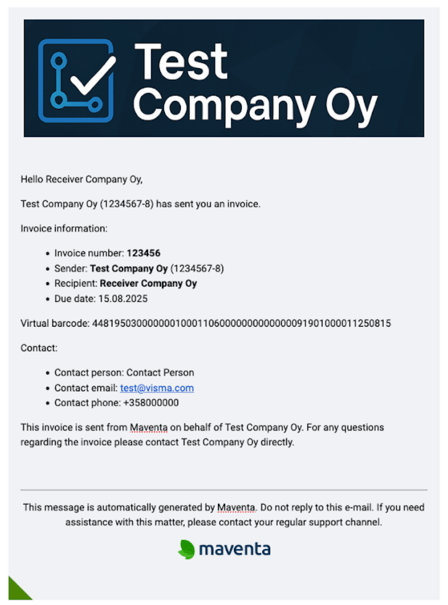
If the sender has added a header image, it appears at the top of the email. The image must be in PNG format, and the recommended size is 650–700 pixels wide and 90–200 pixels high.
The email language comes from the language setting in the invoice XML. Maventa currently supports FI, SE, EN, NO, DK and NL. If the XML has no language, or an unsupported one, the email is usually sent in English. The field that holds the language in each XML format, and the default for each, are listed in the Maventa documentation: Language of the email.
Viewing and downloading invoices in Maventa's display service
The recipient of an email invoice sees the invoice either as a PDF attachment or in a separate display service. This depends on the delivery method the sender has chosen.
If the message contains a download link, the recipient has to sign in with a password before they can view the invoice or download the PDF. The password is included in the email. After clicking the link, the recipient enters the password in the page that opens. They can then view the invoice in Maventa's display service and download it as a PDF.
📌 Please note: The link to the display service stays active for 90 days after the invoice due date. After that, the recipient must contact the sender for a new copy.
If the sender has chosen the delivery method Send with a link to accept or decline the invoice, the recipient goes through these steps:
-
Preview: the recipient first sees only the main invoice details, so they can check the information.
-
Approval: after the invoice is accepted, the recipient can see the payment details and download the invoice as a PDF.
-
Rejection: if the invoice contains an error, the recipient can decline it and send the sender a request for correction.
ℹ️ If an invoice is unfounded, the recipient can report it directly in the service with the “Report” option.