

Instructions for the Finder tool
-
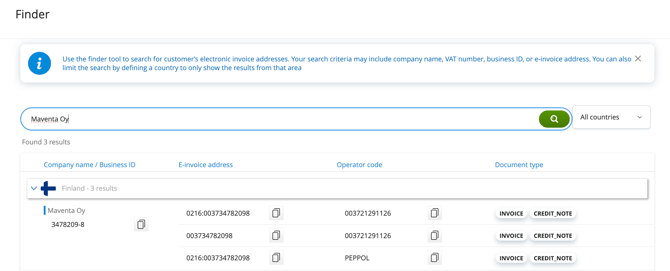
Perform a search and filter the results: Enter the company name, VAT/Business ID, or e-invoice address. You can limit the search to a specific country
-
Review search results: The search results show the company's Business ID, e-invoice addresses, and information on their ability to receive e-invoices
-
Evaluate results critically: Check that the company information matches the entity you are looking for
-
Refine the search if necessary: If you cannot find the correct company, try a different search term or change the filters. Please note that the search results only include entries from the Maventa's register
💡 If you are unsure about the information, verify the up-to-date billing details directly from the recipient