
- Activating Amili Kassavirta service
- Consumer invoicing in the Amili Kassavirta
- Sending invoices through the Amili Kassavirta
- Management of assignments
- Customer grouping
- Change bank account number
- Steps for invoice payment monitoring
- Error messages
- Disabling the Amili Kassavirta
Activating Amili Kassavirta service
1. Activation takes place from the Maventa interface:
-
Log in to Maventa
-
Select "Amili Kassavirta" from the main menu
-
In the page "General Settings", choose the preferred service (Amili Kassavirta or Amili Perintä)
2. Filling in the Information:
-
Fill in your company's information on the form
-
Click 'Continue'
3. Implementation in the Netvisor KYC Service:
-
Follow the link to the Netvisor KYC service
-
Fill in the information request form using personal online banking credentials or mobile verification
-
Accept the service's terms of use
The service will be activated within 1-2 days without additional charges.
You can find more detailed description and instructions of the service activation via API in Amili Kassavirta documentation.
The service integration is available at no extra cost. However, additional costs related to further debt collection measures may arise in later stages of the collection process.
Using the Amili Kassavirta with Connector
It is recommended to disable the functionality of backing up sent invoices in the settings of the Connector.
This functionality may copy invoice details even before Visma Amili Oy has modified them, so the backed-up invoice and the invoice actually sent to the recipient might differ in this context.
Consumer invoicing in the Amili Kassavirta
Make the necessary changes to SI messages, add Visma Amili Oy's account number and ensure smooth consumer invoicing through the Amili Kassavirta.
Steps for making changes to consumer invoicing
1. Activate the service:
-
Activate the Amili Kassavirta. You have five (5) business days to make the necessary changes to the consumer billing agreements (SI messages)
2. Add Visma Amili Oy's account number:
-
Locate the account number (IBAN) for Visma Amili Oy in the Amili Kassavirta settings
-
Add this account number to your consumer billing agreements (SI messages)
3. Send modified SI messages:
-
Create and send CHANGE-type SI messages to all banks with which you have active consumer billing agreements
-
Use your financial management software or the FKL tool (billing notification creation tool on the Finanssiala.fi website) to create these SI messages
-
Note that adding the new account number to the SI messages is recommended, and existing information should not be overwritten
4. Handling SI and RI messages:
-
Verify that invoices are sent through the Amili Kassavirta with the correct account details and reference numbers
-
If you are using a reference number in your software system for matching, combine the original and the sent reference number for the recipient
FAQ
-
What happens if I don't make the changes?
Consumer invoices will result in errors if changes are not made in time. -
How can I ensure that invoices are routed through the Amili Kassavirta?
Once the service has been active for five (5) days and changes have been made, consumer invoices will be routed through the Amili Kassavirta
Sending invoices through the Amili Kassavirta
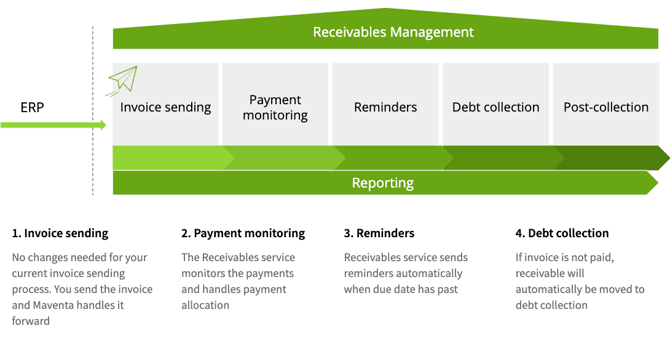
This guide explains how to send invoices through the Amili Kassavirta using certain mandatory information, how Visma Amili Oy processes invoices, and what types of invoices cannot be sent through the service.
Preparations
-
Ensure that the invoice data includes a complete recipient's postal address and a due date at least four (4) bank days in the future
-
Check that the total amount on the invoice matches the sum of the line items and includes a reference number
-
If payment reminders are to be sent in Swedish or English, add a language code to the invoice. Finnish is the default language
-
Use a unique invoice number if possible, unless the following exceptions apply:
-
The new invoice has a different date than an existing assignment
-
The new invoice has the same date as a closed assignment that does not involve payments or credits
-
The new invoice has the same date as an open assignment and the original invoice is in an error state
-
Limitations
-
Only invoices in euros (EUR) are accepted; others are directed straight to the recipients and must be tracked independently
-
The following formats cannot be used: OIOXML, WoodX, BGC, Axflow, Facturae, PX, UBL, Facturae
-
There is a five-day grace period for consumer e-invoices, during which they are sent directly to customers
Processing by Visma Amili Oy
-
IBAN: Account details are replaced with Visma Amili Oy's for them to manage receivables
-
Reference number: Replaced with Visma Amili Oy's own, but accounts are maintained with the original invoice's reference
-
A transfer clause and text with an online service link and login credentials are added
Assignment and monitoring possibilities
-
An assignment is created between Visma Amili Oy and your company for all sent invoices. Monitor the invoice status in the assignment interface and make change requests as needed
FAQ
-
What information should be included in the invoice data?
Recipient's postal address, due date, total amount, reference number, and possible language code.
-
What currency is accepted?
Only euro (EUR).
-
In what cases is the same invoice number allowed?
In certain circumstances, like a different date or error state of an old assignment -
Who monitors receivables?
Visma Amili Oy monitors receivables using the replaced IBAN information.
Management of assignments
This guide addresses the management of assignments for the Amili Kassavirta and Amili Perintä services, including creating assignments, communicating with Visma Amili Oy and browsing different views in the service.
Creating assignments:
-
Amili Kassavirta: An assignment is created for each sent invoice
-
Amili Perintä: An assignment is created for each separately transferred invoice
Communication with Visma Amili Oy:
-
Follow events through the assignment, such as the receipt of payments or the sending of payment reminders
-
Add questions or information to the assignment, e.g., extending the invoice's due date
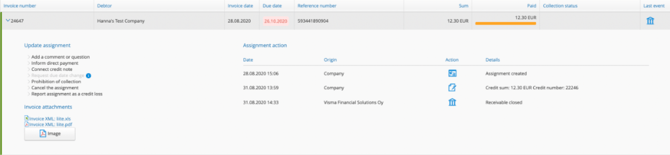
User interface top menu:
-
Select "Amili Kassavirta" to see an overview of assignments
-
The left side of the menu includes the following sections:
-
Assignments: A list of open assignments
-
Messages: Assignments that include a message or comment; it is recommended to actively monitor these
-
Closed Assignments: Paid and manually closed assignments
-
Settings, General Settings: Amili Kassavirta activation information
-
Settings, Customer Grouping: Manage customer groupings
-
Details of a single assignment:
-
Events and messages related to the assignment are visible in the assignment details
Editing Assignment Events
Add a Comment or Question:
-
With this event you can add a comment or ask a question from Visma Amili Oy related to the assignment in question. Visma Amili Oy will also use this event for sending comments or questions to your company
Report an External Payment:
-
If the customer has paid directly to your company's account, you must notify Visma Amili Oy of this to stop the monitoring of receivables and potential collection actions. An external payment can be either the total invoice amount or just a part of it
Link a Credit Note:
-
Match a credit note to an invoice
Request Due Date Extension:
-
Add more time for payment by extending the invoice's due date
Request Temporary Collection Hold:
-
Add a collection hold, edit a temporary collection hold, or suspend the hold
End the Assignment:
-
The assignment is closed, and collection ends
Record the Assignment as a Bad debt expense:
-
Use this option if you want to record the invoice as a bad debt expense
Customer grouping
This guide teaches you how to limit the progression of collections on a per-customer basis using Amili Kassavirta customer grouping. The guide includes the use of VIP and PREMIUM customer groups as well as setting up the no-collection monitoring group.
Instructions for setting up Customer Groups
-
Add a customer to the VIP or PREMIUM customer group to limit the progression of collections.
-
Ensure the customer's information includes the correct business ID.
-
Remove the business ID from the customer group if you wish to continue collections.
Default payment monitoring:
-
Sending the invoice
-
Payment reminder
-
Collection letter
-
Legal collection
-
Post collection

Collection Process
PREMIUM Customers:
-
Send a payment reminder and a demand for payment for an overdue invoice.
-
Collection ends 30 days after the payment demand's due date.
-
An extra charge is incurred from the invoice sender upon the assignment's closure if no payment is made

VIP Customers:
-
Send a cost-free payment reminder
-
Collection ends 30 days after the payment reminder's due date
-
An extra charge per payment reminder is incurred from the invoice sender

No Collection Monitoring Customers:
-
Add the customer's business ID to this group if you wish to avoid collection monitoring
-
Manage collections and prevent expiration yourself. No additional costs
User Interface Customer Grouping
-
Add the customer's business ID to the desired customer group through the interface
-
The same business ID cannot be in multiple groups
-
Customer grouping information appears on the assignment list with a delay (1-2 hours). See the example in the lower image
FAQ
-
How do I prevent the progression of collections for a specific customer?
Add the customer to the VIP or PREMIUM customer group -
What happens if a customer group is changed for an already completed assignment?
Changes do not affect completed assignments -
Can the same business ID be in multiple customer groups?
No, the business ID will be moved to the new group if it is added to another group
Change bank account number
If bank account details have changed and you are using the Amili Kassavirta, the changed account number must be reported to our customer service by the main user of the Maventa account or a person authorized to sign for the company.
Steps for invoice payment monitoring
This guide describes how to handle situations where an invoice is paid on time or is not paid on time.
Paying the invoice on time
-
Send the invoice from your invoicing softawre system
-
Maventa receives the invoice and forwards it to Visma Amili Oy for modification
-
Visma Amili Oy modifies the payment information of the invoice and returns it to Maventa
-
Maventa sends the invoice to the recipient and an assignment is created in the service
-
The recipient pays the invoice using Visma Amili Oy's account details, and the assignment is marked as paid
-
Visma Amili Oy transfers the receivables to the sender's account within a few banking days
If the invoice is not paid on time
-
Visma Amili Oy initiates the reminder and collection processes
-
A reminder is sent to the customer, and the assignment's "Collection Status" shows as "Reminder Sent"
-
The assignment list can be adjusted to show only assignments that have advanced to collection
Please note that all payment monitoring activities and payment handling are managed by Visma Amili Oy. Maventa Oy does not handle payment monitoring or financial transactions.
Error messages
This guide provides instructions on how to proceed if an invoice encounters an error. It offers guidance on resending the invoice and what to do if the invoice cannot be sent.
SEND ERROR REASON: RECEIVABLES-SERVICE: Invoice already exists
-
An invoice with the same number already exists in the service. Use a different invoice number
SEND ERROR REASON: RECEIVABLES-SERVICE: The due date is within three days or has passed
-
The due date is too short or has already passed. Update the due date and resend the invoice
SEND ERROR REASON: RECEIVABLES-SERVICE: Postal code for CITY_NAME could not be found
-
There is an error in the address details. Verify the information and resend the invoice
When an invoice ends up in error
-
Resend the invoice that encountered an error within two (2) weeks
-
If resending is not possible, issue a credit note for the original invoice. Match the credit note to the open assignment to close it
-
If the invoice is not processed, Visma Amili Oy will mark the assignment with a collection hold and contact the sender
-
If you do not intend to resend the invoice, indicate this by commenting on the assignment. Change the invoice number if you create an entirely new invoice
Disabling the Amili Kassavirta
This guide explains how to close the Amili Kassavirta
-
Go to the Amili Kassavirta settings tab from Collection services view
-
Press the "Disable" button
-
After this, invoices will no longer be routed through the Amili Kassavirta
Note that Visma Amili Oy will continue to handle open assignments
Please contact Visma Amili Oy directly for further actions regarding assignments after discontinuing the service.